Getting started
This guide describes the intended setup. The Windows deployment path is not yet verified end to end; validate it on a disposable VM before hardware.
1. Gather prerequisites
You need a Windows x64 or Linux server host reachable from the target, a normal DHCP service, an iPXE boot route, and a disposable x64 UEFI test target with an eligible internal disk (default minimum 64 GB). The engine partitions GPT and runs bcdboot for UEFI; BIOS iPXE observations do not establish BIOS Windows installation support.
Supply your own licensed Windows image, WinPE built with the Windows ADK and WinPE add-on, wimboot, BCD and boot.sdi. The HTTP console and the boot-asset host are separate roles; they can run on the same machine but the console does not serve the staged boot tree. The image source currently supports HTTPS only. The target must trust its certificate.
2. Preview the console
Extract a server release and verify its checksums. Set M2W_TOKEN, then start with -listen 127.0.0.1:8080. Open the console at http://localhost:8080. Windows opens the browser by default; Linux users open it themselves.
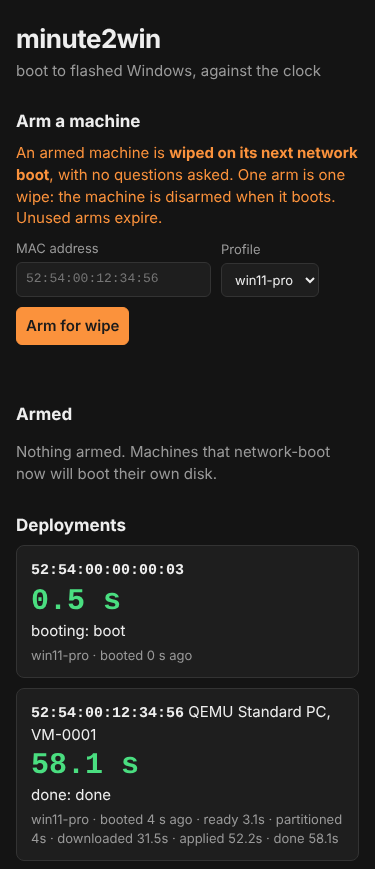
Demo data from the automated UI test: the MAC, the QEMU machine and the 58.1 s lap times are fixtures, not a measured deployment. The page works at phone width and follows the light or dark setting.
Do not arm a real target during a preview. Binding to loopback prevents remote targets reaching the console, but is not a deployment simulation.
3. Create your deployment profile
Create a separate directory such as profiles/ and copy a template from manifests/examples/ in the source checkout, or adapt the included manifests/win11-pro.json. Set an HTTPS image URI, its exact SHA-256, and the image edition. Use a profile filename such as lab-win11.json; the UI calls it lab-win11.
On Windows, compute the image hash with:
Get-FileHash C:\images\install.wim -Algorithm SHA256
On Linux:
sha256sum /srv/images/install.wim
Keep tenant.joinMethod as none, oobe.adminUser as null, and the default countdown for initial testing. Do not use placeholder hashes or the restricted maintainer image URL. Read Manifest reference for capacity checks and the consequences of creating a local OOBE administrator.
4. Build and host the boot assets
Follow Boot assets. Build WinPE with -Base set to your own boot-asset URL. Stage the matching engine scripts under that same base. Confirm from the deployment network that the boot files, scripts and Windows image are reachable.
5. Start a reachable server
Use an actual LAN address or wildcard listener, your own profiles, and your own image base. For example, on Linux:
export M2W_TOKEN='replace-with-a-long-random-token'
./minute2win-server -listen :8080 -manifests ./profiles -data ./data \
  -image-base https://deploy.example.net/windows11 -open=false
Replace deploy.example.net with your host. Permit TCP 8080 from the deployment network. On Windows, set $env:M2W_TOKEN and pass the same flags to minute2win-server.exe. Use a trusted deployment network: the token gates mutations, while state and boot routes remain reachable without it. HTTP does not encrypt the token; use network isolation or an appropriately configured TLS front end.
Choose one boot route:
- Existing iPXE: chain the URL printed by the server, such as
chain http://192.168.1.50:8080/boot/${net0/mac}. - Built-in PXE: add
-pxe -pxe-dir /srv/ipxewith your own iPXE files and allow UDP 67, 69 and 4011. Linux needs privileged-port access; Windows needs Administrator. Keep normal DHCP running. See Server reference. - USB/iPXE: configure your boot drive to chain the server URL. The separate kvm-it project provides one such boot route.
6. Arm once and observe
Confirm the VM’s MAC and that its disk is disposable. In the console enter the token, select your profile, and arm that MAC. Boot it through iPXE. Requesting /boot/<mac> consumes the arm; the deployment appears on the board.
If the boot fails after consumption, diagnose it before re-arming. Disarming cannot cancel an already started deployment. In WinPE, any key during the countdown aborts; a zero countdown removes that opportunity.
Check the actual Windows boot and logs rather than treating a board outcome as proof. Logs should be copied to C:\Windows\Logs\minute2win\. Validate the whole sequence against Status, record the VM configuration and timing, then test another network boot without re-arming: it must not deploy again.